

BERKLEYNET AGENT PORTAL GUIDE
Everything you need to do, all in one place
The BerkleyNet portal gives insurance agents the tools to quote, bind, renew, and service workers compensation policies - 24/7.
What can you do in the BerkleyNet Portal
Tools to help you work smarter and serve your clients better.
Quote & Bind
Get fast quotes and bind workers comp coverage online.

Manage Policies
Endorse policies, view and download documents, and more.

Billing
View invoices, make payments, set up Auto-Pay, and track payment history.

Claims
Search claims, view loss runs, and access claims reports and contacts.

Agency Management
Add users, manage permissions, and control access for your agency.

Renewals
View upcoming renewals and manage your book of business.
How it works
Get started in just a few simple steps.
1
Request Access
Request portal access or have your agency administrator add you as a user.
2
Check Your Email
You'll receive an email with your username and instructions to set your password.
3
Log In
If you have access to another Berkley business portal, use the same username & password to log in.
New to the portal?
Check out our training resources and quick reference guides to help you get the most out of the portal.
AVAILABLE FEATURES
New Business
The BerkleyNet portal makes it easy to submit, quote, and bind eligible workers compensation policies directly online. Appointed agents can manage submissions from one centralized experience while tracking progress from quote through issuance.
SERVICING EXISTING ACCOUNTS
Servicing Policies
Access policy information, submit endorsements, and retrieve important documents without leaving the portal. Self-service tools make it easier to manage day-to-day policy activity.
PAYMENTS AND ACCOUNT INFORMATION
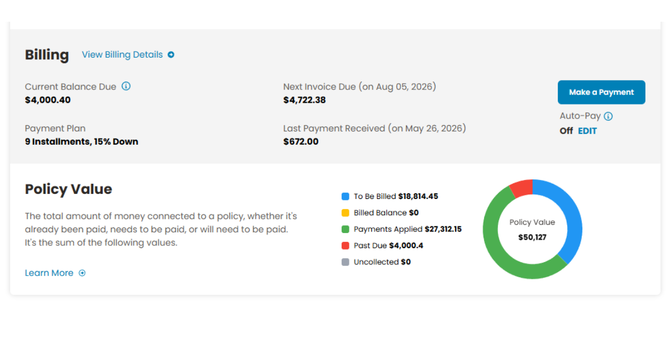
Billing
Review invoices, monitor payment activity, and access billing tools that make it easier to support insureds throughout the policy term.
Claims INFORMATION
Claims
Access claim details and activity directly through the portal to stay current on important developments.
Additional Tools and Resources
The portal offers more than policy management tools. Access resources, support, agency information, and helpful shortcuts designed to make your day easier.
Resource Center
Access a variety of one-pagers, brochures, and more ranging from marketing and portal training to claims and policy.
Recent Announcements
Stay up to date on portal enhancements, product updates, important notices, and more. View announcements from the Agent Dashboard.
Commission Statements
View and download commission statements directly through the portal. You can filter statements by policy and date.
Universal Search
Use the search bar in the top right corner to find policies by name, account, or BNET/BNU policy number.
Help Center
Use this Quick Links feature to get in touch with our team, find a doctor or pharmacy, or give feedback about portal.
Quick Service and Chat
Need help? Use the Quick Service and Chat tool to connect with our team and get answers without leaving the portal.